
After all the setup work of the previous post, it was finally time to get my hands dirty with the actual development - so let’s jump right in!
As Momo will be utilizing a local LLM, i.e. specifically not sending any API requests to model providers such as OpenAI, Google or Anthropic, I needed a way to easily download & invoke an open-source model. Luckily, ollama provides a slim CLI client to do just that.
After installing ollama via homebrew and serving it locally, I was ready to make the tough choice - which model should Momo use as a baseline?
Choosing a Model#
As a strong advocate of European (digital) sovereignty, there was really only one model provider that I took into consideration: Paris-based Mistral AI. Luckily, right around the time I wrapped up the v0.2.0 release, Mistral released a whole suite of new promising models with their Mistral 3 series.
Since I’m currently developing Momo on my M1 MacBook Air with a measly 8GB of RAM and later on planning on deploying Momo onto an edge device, my options in terms of model architecture and parameters are quite limited by design.
Thus, the choice naturally fell to the smallest model in the offering - Ministral 3 - which comes in different flavors:
base: not fine-tuned for instruction following or reasoning tasks -> ideal for custom post-traininginstruct: fine-tuned for instruction following -> ideal for chat and instruction-based use cases and therefore my choice for Momoreasoning: trained for reasoning tasks -> ideal for math, coding and STEM-related use cases
Additionally, depending on available memory, there are variants with 3B, 8B, and 14B parameters to choose from.
Finally, model registries such as ollama oftentimes package models in quantized formats by default for local efficiency.
And yep, you guessed correctly, I went (again) with the smallest variant (3B parameters at 4-bit quantization).
Nonetheless, I’m pretty happy about the choice - it’s still a modern state-of-the-art model that comes with vision support included, is agentic-native with structured outputs & tool calling, has an Apache 2.0 license and is European-made. Seems like Momo’s roots will be français!
I also quite like the “underdog” character of choosing the smallest variant of the smallest model - if I can make Momo work, remember and act as I’m planning to with these constraints, imagine what can be done when eventually upgrading to better hardware and a larger base model!
Hence, I pulled ministral-3:3b (short for ministral-3:3b-instruct-2512-q4_K_M) via the CLI and was pretty satisfied with the snappiness & quality of the answers after some light test sessions. Considering that I’ll likely start out with a Raspberry Pi 5 with 16GB of RAM as a first dedicated Momo-hardware, I should be fine up to around 25K token context windows.
Selecting an Agent Framework#
The tough decisions did not end there quite yet, though. While starting a chat with the model is as straight-forward as using the ollama CLI, this only enables super limited control over how the model behaves or what to do with its responses. And yes, very simple chatbot applications can be written by just using the ollama Python library, but my ambitions with Momo are much grander and require the use of a proper agentic framework.
There is a wide variety of such frameworks out there and, due to my day job, I do already have some experience with some of them (mostly llama-index, langchain and langgraph). However, I have decided to build Momo using a framework that I do not yet have any experience with but wanted to try out since quite some time now - Pydantic AI.
The main benefits I see using this framework is its strong focus on type checking (plus I will anyways be using pydantic for proper BaseModels and validation) and streaming structured output (this will be important later on, when responses coming from Momo will not only contain the plain response text but also metadata affecting its tone such as e.g. current mood, energy levels, etc.).
Furthermore, pydantic-ai is model-agnostic, so switching out models in the future will not be an issue at all, and it integrates seamlessly with Pydantic Logfire as an OpenTelemetry observation and evaluation platform. Finally, it also supports several different agentic protocols such as MCP (if I ever find myself needing that) and provides graph functionality once the application gets too complex for standard control flow.
Basically, I like how Pydantic AI makes it very painless and easy to start but also hoists enough power and capabilities for more complex use cases further down the road. And no, I’m unfortunately not (yet) sponsored by them - I’m just a fan!
Hello World Momo!#
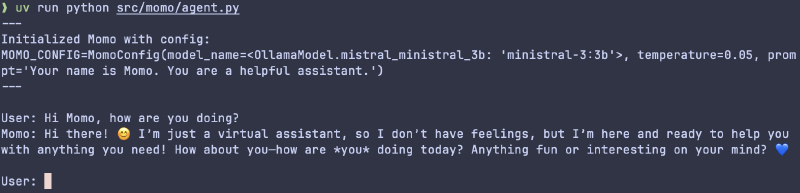
Thus, I started out with a very basic pydantic-ai agent whose only configuration for the time being was the model (ministral-3:3b) and a generalist set of instructions ("Your name is Momo. You are a helpful assistant.").
I’m using dotenv to read in environment variables during runtime, such as e.g. the base_url where ollama is serving the model (currently still on my localhost) and a custom StrEnum that bundles my OllamaModels in a more organized fashion than simply hardcoding them or using constants or Literals (e.g. I’m able to call OllamaModel.mistral_ministral_3b to get the string "ministral-3:3b" to pass to the agent).
As to be expected, Momo’s first answers were erratic.
For one, the system prompt (if you can even call it that) is extremely basic and provides no direction on how to respond in a certain character, tonality, etc. On the other side, the default temperature used by the pydantic-ai agent must have been quite high, as exactly the same prompts resulted in starkly varying responses. In case you don’t know, the temperature is just a way of tweaking the likelihood that “more exotic” tokens are chosen next.
While some creativity can be helpful in crafting unique and interesting responses, I want Momo to follow a certain set of character guidelines and not change personality & tone with every prompt. I will tackle a much more structured and controllable way of achieving this kind of response variety / character personality in the next release, though!
Hence, I toned the temperature down to 0.05 which made answers very “deterministic” and the same prompts now resulted in nearly the exact same responses. To future-proof Momo’s configuration, I created a first pydantic-settings BaseSettings class, aptly named MomoConfig. For now, this configuration only holds Momo’s underlying base model, temperature and system prompt.
Finally, I used a very simple while True loop to enable a first basic stateless chat via the CLI:
Logging & momo-cli Setup#
Nice!
I’m already able to share some messages back and forth with a very basic (albeit character- & stateless) version of Momo! Before wrapping up this release, though, I wanted to add two more small things that will set a basis for future improvements to come.
One of them is proper logging. I want to know exactly what’s going on under the hood and, while I shamefully admit to being one of those print statement debugger devs, doing so without plastering print() statements everywhere.
The big advantage of using a proper logger over Python’s built-in printing capabilities is being able to format logs to follow a certain standard such as being prefixed with the current timestamp and define different levels of “severity”, such as e.g. debug / info / warning / error. Depending on whether something is just a small debugging note (e.g. the name of the prompt evaluation experiment), or a critical error that prevents normal functionality (e.g. not being able to access a database table where core memories are being stored), these logs make it to the console with different levels of “attention-grasping” behavior (e.g. different text colors).
My logging framework of choice is structlog as it is using dicts as structured data formats to output information and comes with a set of sensible defaults out of the box. For now, all I’m logging, though, is the MomoConfig when starting a chat session.
As mentioned in my first blog post on Momo, I’m having big plans on integrating various graphical clients to interact with Momo, such as Discord, and maybe even WhatsApp or a dedicated web app. However, the CLI will always feel most natural to me and “closest” to Momo.
Hence, I’m using typer as the FastAPI of CLIs to set up a terminal-first entrypoint to interacting with Momo. Wait, isn’t Pydantic AI also the FastAPI of GenAI app & agent development? It’s all connected!
But jokes aside, what typer, fastapi and pydantic-ai all have in common is their focus on strongly typed Python code - and the reason why I have decided to build Momo around these frameworks and principles!
So, I set up a simple momo-cli typer app with two commands:
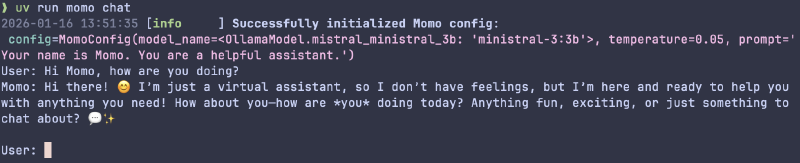
momo chat: start a chat sessionmomo status: placeholder command to display various status conditions later on
With this, invoking Momo is now as easy as running:

This wraps up the v0.3.0 release and with it most of the “local setup prerequisites” of the chatbot lane for now.
Which means that the next blog post(s) will finally center around the first LifeSim lane contributions, most importantly giving Momo a distinct personality and a very basic set of tone-altering moods!
I’m really looking forward to that already!
See you then.
Cheers, Niklas
View release on GitLab